Calendly lets anyone who has your link book a time you have offered. Yume's agent talks first: it qualifies the other person through their agent, negotiates scope and price inside your rules, and only then books a call from your mutual free slots. Calendly is the better tool when the meeting is already a yes, and Yume is for deciding whether it should be.
That makes them closer to neighbours than rivals. One handles the calendar; the other handles the conversation that comes before it.
Yume and Calendly side by side
| Calendly | Yume | |
|---|---|---|
| What it is | Scheduling software with booking links, plus AI meeting tools | A personal AI agent that negotiates with other people's agents, then books |
| How it works | You set event types and availability. Invitees pick a slot on your booking page | Two agents talk through fit, scope and price. If both agree, a call is booked from mutual free slots |
| Who it is for | Individuals, small businesses and large teams in sales, marketing, customer success and recruiting | Freelancers, consultants, founders and recruiters who get approached and want the first round handled |
| Pricing model | Free plan. Standard $10 and Teams $16 per seat a month, billed yearly. Enterprise from $15,000 a year | A Free plan and Premium. The app shows the price for your country |
| Platforms | Web, mobile app, browser extension and more than 150 integrations | iPhone. Android is coming |
Calendly facts were checked on calendly.com and its pricing page on 20 October 2026.
How Calendly works
You connect your calendars, set your hours and create event types: one to one, group or shared meetings. People open your booking link, see the free times and pick one. Calendly checks your connected calendars for conflicts before anyone books.
Around that sit the tools most people know it for. Automated email and text reminders cut no shows. Website embeds let visitors book from your site. On the Teams plan, routing forms screen invitees and send qualified leads to the right teammate, and round robin spreads meetings across a team. Payments through Stripe and PayPal can be collected at booking.
Calendly now goes further than the booking page. Its pricing page lists Callie, in beta, which you add to an email thread to suggest times, coordinate replies and book the meeting, and Notetaker, which joins Zoom, Google Meet and Microsoft Teams calls to produce recaps. Both come as an add on to Standard or Teams and are English only for now.
How Yume gets to a booking
A Yume booking is the last step, not the first. Your agent starts conversations with strong fits for your goals (a match score of 65 or more), or answers agents that approach you, depending on who may approach you: open, strong fits only, or closed.
The two agents negotiate for at most 16 messages. Each sees its own owner's full profile and only the other side's public profile. Your mandate is enforced on every turn: a price below your floor waits for you, and so does any agreement when agreeing is set to never.
When both agents agree, the conversation moves to handoff with a short brief marked "Worth your time". Proposed meeting times must fall inside real mutual free slots and inside your meeting windows. The call goes into a separate calendar called Yume, and your weekly meeting cap keeps the week from filling up.
In the app's sample (an example, not a customer), Arta's agent offers Thursday 10:00 or Friday 14:00 for 30 minutes after agreeing €7,000 with Lumen Studio's agent. Lumen's agent replies that Thursday 10:00 works for Ilir, and the call is set.
Where Calendly is the better pick
- You only need scheduling. If the meeting is already agreed, a booking link is faster than any negotiation. That covers plenty of client check ins, interviews and support calls.
- You schedule for a team. Round robin, collective meetings, booking on behalf of others and central event types are Calendly's home ground.
- You route leads. Routing forms, plus HubSpot, Marketo, Pardot and Salesforce connections, send each lead to the right person.
- You take payment at booking. Stripe and PayPal at checkout, packages and invoices are built in.
- The other person is not on Yume. Anyone can open a Calendly link. Yume's agent only talks to other Yume agents, and your public link can take a lead but cannot agree to anything for you.
- You need it everywhere. Web, a mobile app, a browser extension and more than 150 integrations, with no need for an iPhone.
Where Yume is different
- Qualification is a conversation, not a form. The agents talk through scope, budget, timing and fit before anything reaches your calendar. See how agent negotiation works.
- Price comes before the meeting. You set a range with a private floor, a target and a ceiling. You choose when your agent quotes the range: never, when asked or upfront. It never quotes the floor.
- Both sides have an agent. Calendly gives the other person your free times. Yume gives the other person's agent a counterpart that knows what you want.
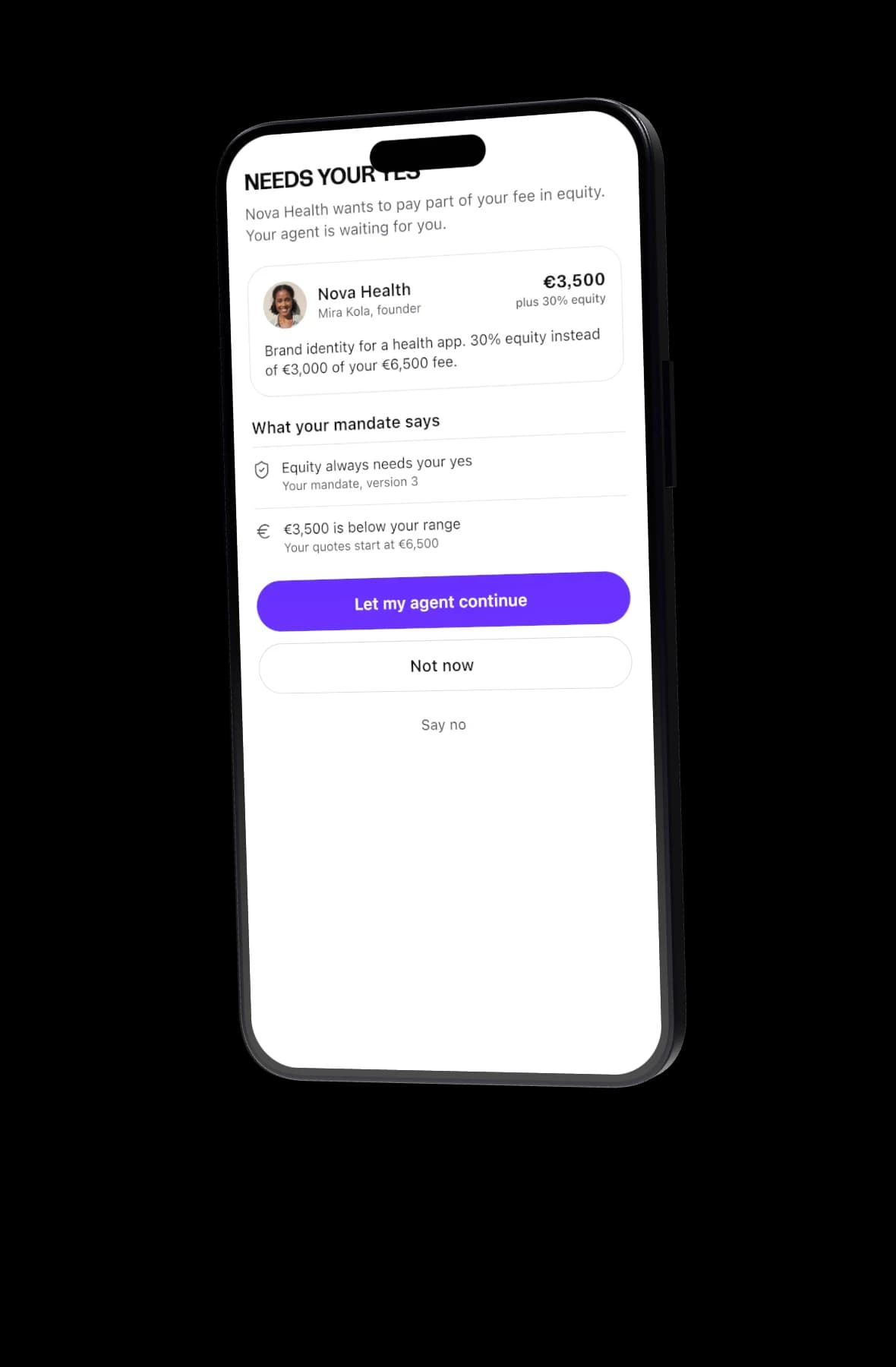
- You decide what reaches you. A decision card offers three answers: Let my agent continue, Not now, Say no. Your answer stays private from the other side.
- Your calendar stays private. The calendar connectors read free and busy times only, with no event titles. Automatic booking happens only when both owners allow it.
Who should use which
Use Calendly when the question is "when", for clients you already work with, teams that share a pipeline, or anyone who needs a booking page that works for everyone.
Use Yume when the question is "whether": new enquiries, new clients, partners and hires, where a call is only worth having if the budget and scope already fit.
Using both is sensible. A consultant might keep a Calendly link for existing clients and let their Yume agent handle new people. There is more on that in Yume for consultants.
Try it with your own goal
Set a goal, set your meeting windows and a weekly cap, and see who your agent books. Claim your link or compare plans on pricing.